MAX does not accept deposits transferred via Taiwan Pay (Taiwan Mobile Payment). If you use Taiwan Pay for transfers, your deposit will not be processed successfully, and we will issue a refund for you. You will receive a relevant email notification; please check and reply to it in a timely manner.
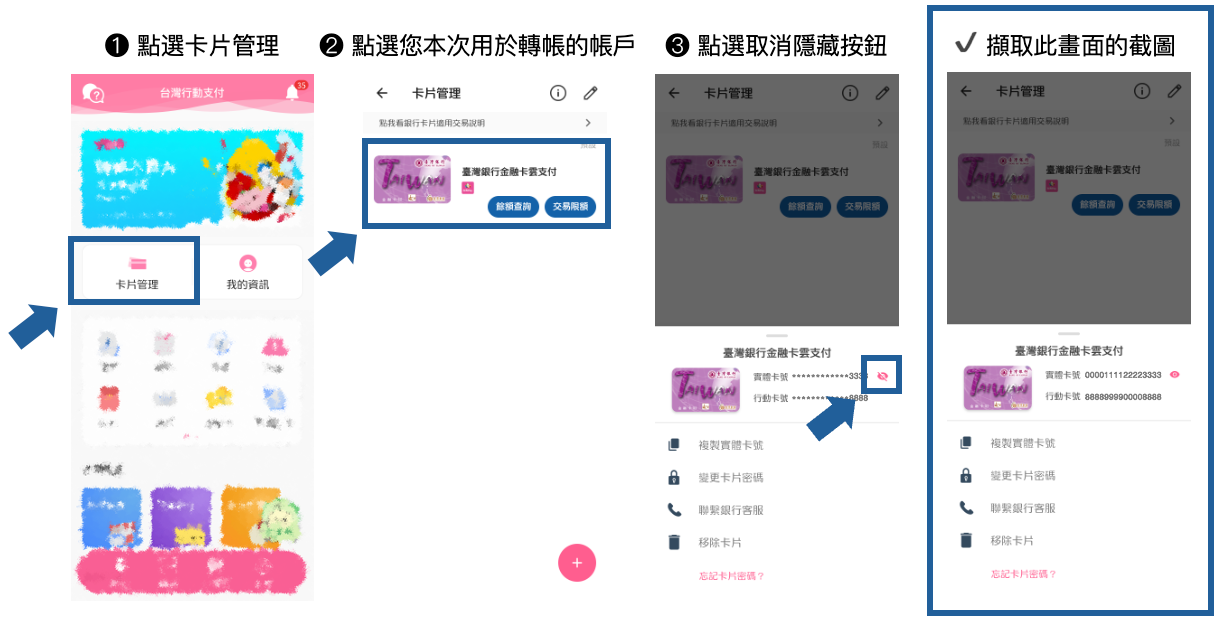
Since the banking system cannot retrieve the actual bank account number linked to Taiwan Pay, please attach a screenshot containing both your full physical card number and virtual card number when replying to the email. The refund will be credited back to the physical card number upon processing.
How to Obtain the Screenshot
- Open the Taiwan Mobile Payment app and tap Card Management.
- Select the account used for this transfer and open its details.
- Tap the unhide button to display the full account number.
- Take a screenshot of the page, ensuring it clearly shows both the complete Physical Card Number and Virtual Card Number.